Showing posts with label Tutorials. Show all posts

Monday, May 7, 2007

Easy Scalloped Edges

I've been promising another tutorial, and finally here it is! Scalloped edges is one of the latest trends in paper crafts - if you browse through the aisles of your local craft store, you'll find dozens of scissors and specialty punches that will cut a scalloped edge. I'm going to show you three different ways to achieve the scalloped edge look with punches you may already have on hand. We'll be using the Slit Punch, the Corner Rounder, and the 1 1/4" Circle Punch.

First, we'll use the Slit Punch. Typically, the Slit Punch is used to punch a little, half-moon shaped notch in the cardstock perfect for a matchbook card or a gift card holder. However, by simply punching the slits in a row so that the edges overlap, you can create a scalloped edge.

Start by punching your first slit in a strip of cardstock so that the edge of the punched half-moon slit will hang off the edge of the cardstock. (I find it easier to work left to right, but you may certainly punch right to left). Next, slide the punch down so that the second half-moon slit will barely overlap the edge of the first. Continue punching along the strip of cardstock - making sure that each punch slightly overlaps the previous one.

After you have punched the entire strip of cardstock, you'll be left with a long scalloped border. Use a little adhesive to incorporate this into a card or a scrapbook page!

The next punch we'll be using is the Corner Rounder. This punch is self-explanatory..you use it to round your corners. But if you take the plastic guide off the punch, the corner rounder will also punch a small slit, so it too can be used to create a scalloped edge.

So, the first step when using this punch is to carefully remove the plastic guide. It normally slides off with a little pressure, but too much pressure may snap the plastic...so be gentle! Once the guide has been removed, you want to start by punching your first slit in a strip of cardstock so that the edge of the punched slit will hang off the edge of the cardstock. Continue punching along the strip of cardstock - making sure that each punch slightly overlaps the previous one.


After you have punched the entire strip of cardstock, you'll be left with a long scalloped border. When you use the Corner Rounder, as opposed to the Slit Punch, you'll get slightly smaller scallops...the same technique with two different punches yeilds two totally different looks!


The last punch we'll be using to create scalloped edges is the 1 1/4" Circle Punch. Note that this technique can be used with any size circle punch! The first step is to punch a handful of circles out of a scrap piece of cardstock.

Next, use adhesive to attach the punched circles to the back side of the cardstock you wish to have a scalloped border. Trim off any piece of punched circle that my hang over the edge. Flip the cardstock over and cover the seam with a small piece of cardstock or ribbon!

Pull out your punches and try out these techniques. While we all love to get new toys, sometimes the tools that we have on hand can get the job done themselves!

Tuesday, March 27, 2007

My First Tutorial - Masking

OK - Here goes nothing!! I worked this weekend on coming up with the first online tutorial for my blog...now lets see if I can actually post it!

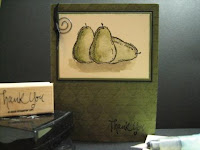
The masking technique allows you to add dimension to an otherwise flat project. You would use this technique to make it seem like one image (in this case, the middle pear) is in front of something else (the other two pears).

For this technique, you will need the following supplies:

Stamp set
Ink Pads
Post-it Notes
Paper Snips
Cardstock

STEP 1


The first step to this technique is to stamp the image you want in
the foreground. This is the image that you want to be "in front".
In this example, I stamped the pear image on to the Very Vanilla cardstock using the Black Stazon ink pad.


STEP 2
Next, stamp the same image on to a post-it note - try to get some part of the image over the sticky part at the top of the post-it note. (This will help the image stay put). Carefully cut out the image with paper snips. If you do not have any post-it notes on hand, use a piece of scrap paper and apply some removable Dotto on the back side.


STEP 3
Place the cut out image directly on top of the previously
stamped image.


STEP 4
Now, stamp the images you want to appear in the background. Stamp them so that part of the image overlaps the masked one. Don't worry - the mask protects the first image! In this example I wanted the center pear to seem like it was sitting in front of the ones on the right and left. So I stamped the other pears and slightly overlapped the edges. Once you are satisfied with your background, remove the mask.


STEP 5
Watercolor, chalk, or embellish the images as you wish. For an added effect, use shading to accentuate the layers.


FINISHED PRODUCT: